
Current State Registration Endpoint
Note: When updating the WCF connector the configuration file will lose the ExternalUsageAPIKey value
Endpoint URL
[POST] https://[address]:[port]/rest/ExternalSetCurrentState
The endpoint supports both Totalview userid and email
Configuration
Configure The API Key In The WCF Config
Find the installation directory for Totalview and navigate to
WCF\MobileWeb_*Open
Totalview3WCF.exe.configSet the value attribute for the
ExternalUsageAPIKeyto a secure and unique stringIf
ExternalUsageAPIKeyis not present, you can add it yourself:<?xml version="1.0" encoding="utf-8"?> <configuration> ... <appSettings> <add key="ExternalUsageAPIKey" value=""/> </appSettings> ...
Calling The Endpoint
You will need to specify five parameters alongside a header:
- Parameters
UserID- note: this field can be set to a userid or emailStateIDCommentStartTime- note: this field should be set to unix time in millisecondsEndTime- note: this field should be set to unix time in millisecondsAttachment- note this field is optional
- Headers
x-api-key- This is the API key you specified inTotalview3WCF.exe.configasExternalUsageAPIKey
Example of unix time in milliseconds
Unix time is defined as seconds since 1/1/1970
The date: 20/6/2022 11:07:01 AM in unix is 1655719621 that means 1655719621 seconds have passed since 1/1/1970
When sending requests to the ExternalSetCurrentState endpoint we want unix time passed in milliseconds that means we need to multiply the
unix time by 1000
That means 1655719621 should be passed as 1655719621000
Requirements for Attachment
The root of the XML has to be of type ATTACHMENTS
ATTACHMENTS can be sent without any child elements:
<ATTACHMENTS />
If ATTACHMENTS has descendants, the first level descendants should be of type ATTACHMENT
ATTACHMENT elements have four required attributes:
CAPTIONis the attachment section caption shown in F5/F6 (In the Totalview Client).ATTACHMENTIDis an unique id for this attachment. This must be unique for each Attachment connector.PROVIDERis the name of the Attachments connector in TotalviewVERSIONis the version of the XML
All ATTACHMENT elements require atleast one FIELD descendant
FIELD elements have four required attributes:
FIELDIDis a unique id for this ATTACHMENTDEFINITION.CAPTIONis the label for the field.DATAIDcorresponds to the ID of the ATTACHMENTDEFINITION in XML, SQL, or Business CentralDATAVALUEcorresponds to the VALUE of the ATTACHMENTDEFINITION in XML, SQL, or Business Central
<ATTACHMENTS>
   <ATTACHMENT CAPTION="Case" ATTACHMENTID="XMLCASE" PROVIDER="Attachment" VERSION="1.1">
      <FIELD FIELDID="CUSTOMER" CAPTION="Customer" DATAID="1000" DATAVALUE="Jackson Car Sale">
         <FIELD FIELDID="CASE" CAPTION="Case" DATAID="1001" DATAVALUE="Totalview 3 TRS">
            <FIELD FIELDID="ACTIVITY" CAPTION="Activity" DATAID="1002" DATAVALUE="Installation">
               <FIELD FIELDID="SUBACTIVITY" CAPTION="Sub activity" DATAID="1003" DATAVALUE="Server setup" />
               <FIELD FIELDID="WORKTYPE" CAPTION="Work type" DATAID="1007" DATAVALUE="On location" />
            </FIELD>
         </FIELD>
      </FIELD>
   </ATTACHMENT>
</ATTACHMENTS>
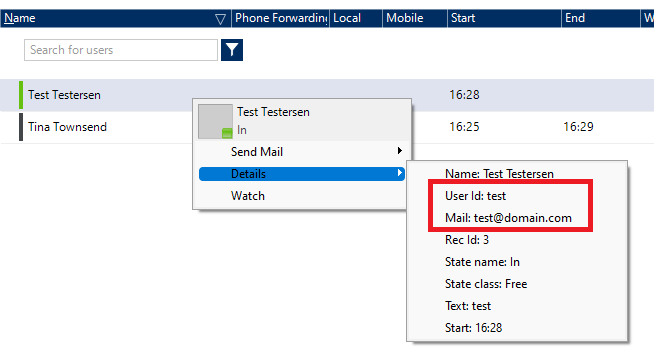
Finding The UserID / Email Address
You can find a user’s UserID and Email by right-clicking on the user in the Totalview Client
Finding The StateID
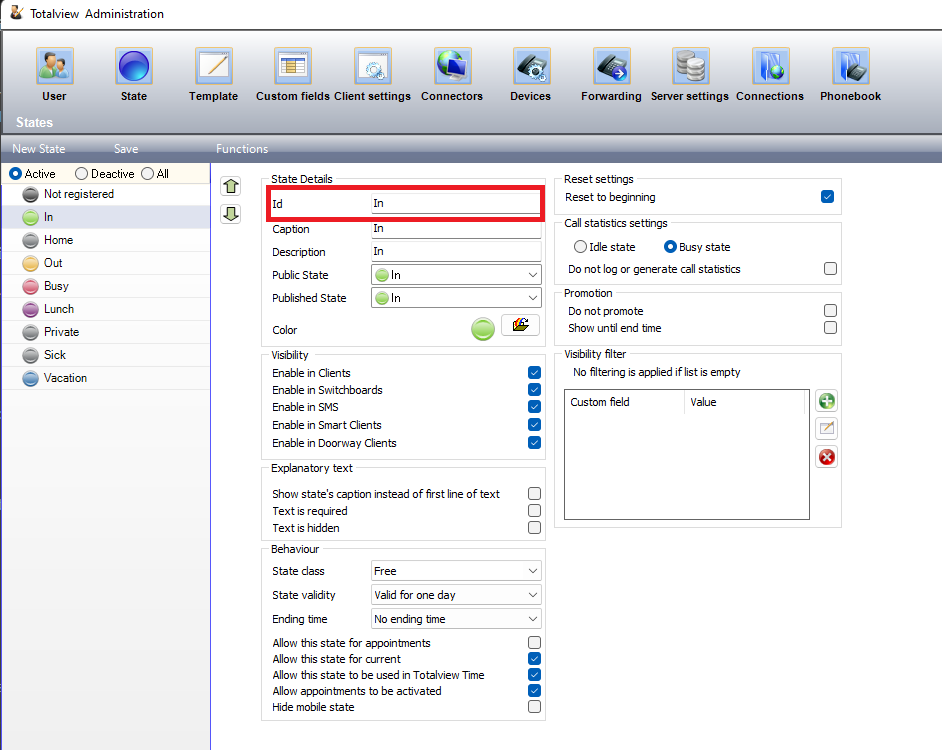
Open Totalview Admin
Navigate to the state view
Click on any of the states
The
StateIDis the first field called Id
Example Calling The Endpoint Via cURL
curl --location --request POST 'https://[address]:[port]/rest/ExternalSetCurrentState' \
--header 'x-api-key: APIKEY' \
--header 'Content-Type: application/json' \
--data-raw '{
    "UserID":"test@domain.com",
    "StateID":"In",
    "Comment":"Production Support",
    "StartDate": "/Date(1655363801000)/",
    "EndDate": "/Date(1655394401000)/",
    "Attachment": "<ATTACHMENTS><ATTACHMENT CAPTION=\"Case\" ATTACHMENTID=\"XMLCASE\" PROVIDER=\"Attachment\" VERSION=\"1.1\"><FIELD FIELDID=\"CUSTOMER\" CAPTION=\"Customer\" DATAID=\"1000\" DATAVALUE=\"Jackson Car Sale\"><FIELD FIELDID=\"CASE\" CAPTION=\"Case\" DATAID=\"1001\" DATAVALUE=\"Totalview 3 TRS\"><FIELD FIELDID=\"ACTIVITY\" CAPTION=\"Activity\" DATAID=\"1002\" DATAVALUE=\"Installation\"><FIELD FIELDID=\"SUBACTIVITY\" CAPTION=\"Sub activity\" DATAID=\"1003\" DATAVALUE=\"Server setup\" /><FIELD FIELDID=\"WORKTYPE\" CAPTION=\"Work type\" DATAID=\"1007\" DATAVALUE=\"On location\" /></FIELD></FIELD></FIELD></ATTACHMENT></ATTACHMENTS>"
}'
Example of a successful call
{
   "ExternalSetCurrentStateResult": {
      "Error": "",
      "Status": true
   }
}
Example of a failed call
{
   "ExceptionType": "InvalidStateID",
   "Message": "No state found matching the StateId:In for userid:test@domain.com"
}